Step by step
Get PDF Easy
Download PDF Easy for free from the App Store or Google Play. There's no account to create.
Open your PDF
Tap the red Add PDF or presentation card on the home screen. Got the PDF in Mail or WhatsApp? Tap it, tap Share and choose PDF Easy.
Draw your signature
Tap Sign in the tool bar, then New signature. Draw with your finger or Apple Pencil, pick the ink colour and thickness, and save it. It's kept for next time.
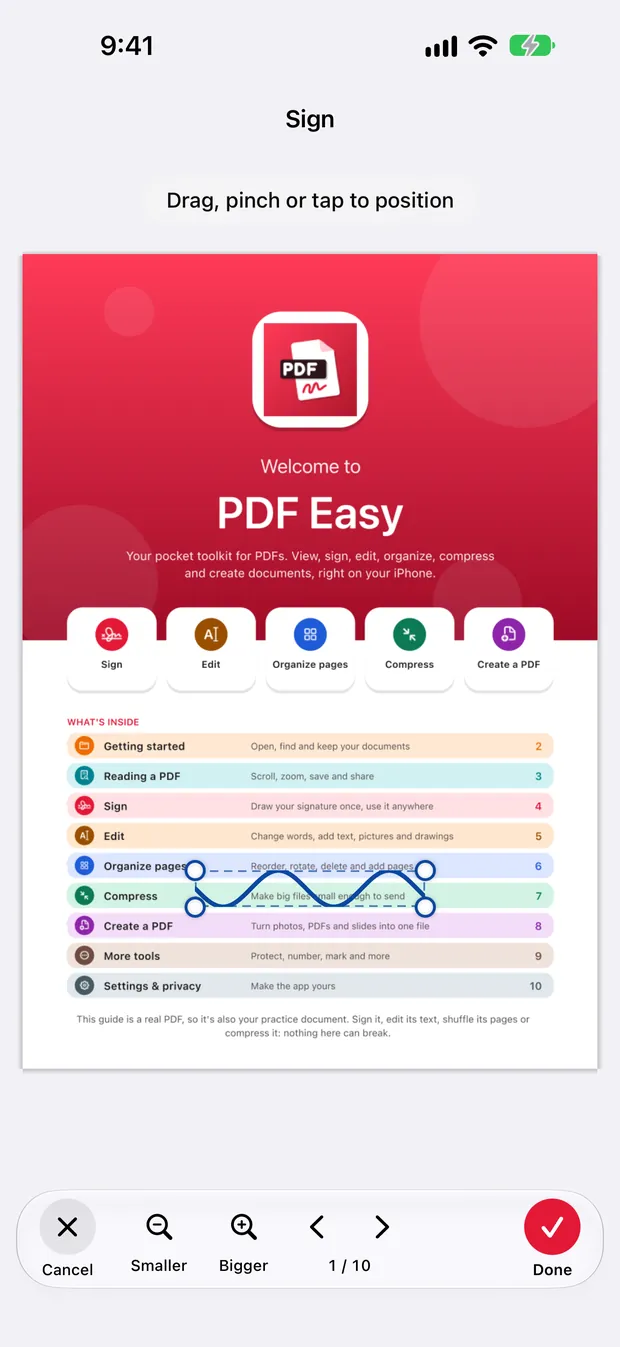
Place it on the page
Tap your saved signature. Drag it into place, pinch or pull a corner to resize it, or tap a spot to drop it there.
Save the signed PDF
Tap ✓ at the bottom, then Save. PDF Easy saves a new signed PDF, and your original stays exactly as it was.
Good to know
- Saved signatures are encrypted and stored only on your device. They are never uploaded.
- Keep more than one, for example your full signature and your initials.
- The signature becomes part of the page, so it shows in any PDF app, printer or email.
Questions
Is it really free to sign a PDF?
Yes. Signing is free, like every feature in PDF Easy, with no watermark, no ads and no subscription.
Is a signature drawn on my phone valid?
A drawn signature is accepted for most everyday documents. Some official documents need a certified digital signature, so check with whoever asked you to sign.
Can I sign a PDF on Android or iPad?
Yes. PDF Easy works the same on iPhone, iPad and Android.
More guides
How to edit the text in a PDF on your phone
Open the PDF in PDF Easy, tap Edit, tap the shaded line you want to change, type the new words and tap ✓, then tap Done and Save.
Read the guide →How to merge PDF files into one on your phone
On the PDF Easy home screen, tap Merge, add your PDFs, arrange the pages, then tap Create PDF and Save.
Read the guide →How to make a PDF smaller on your phone
Open the PDF in PDF Easy, tap Compress, choose a level, tap Compress PDF, compare the sizes, then tap Use smaller version and Save.
Read the guide →